Free Google Docs CV Templates for Students
Find a CV template Google Docs can open and edit. Download three free student designs in A4 or US Letter, with Word files and PDF previews.
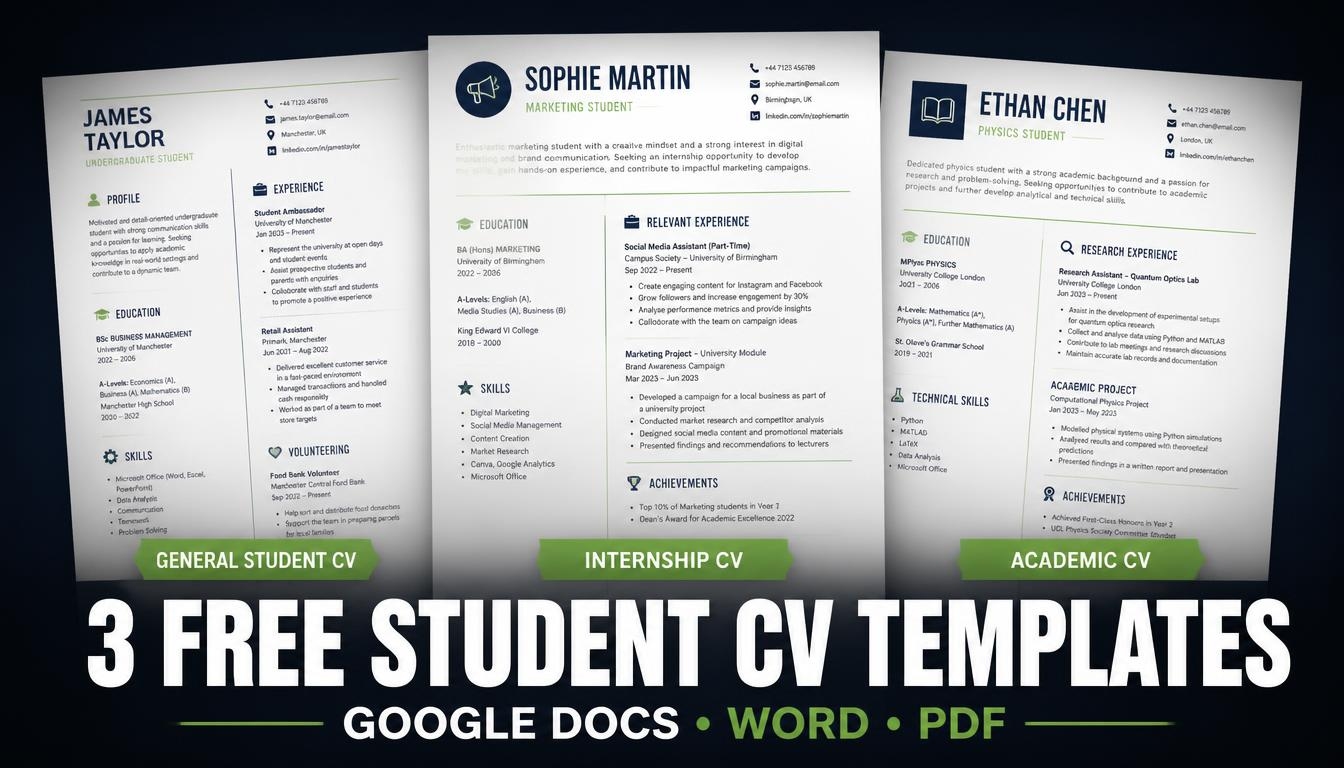
Creating your first CV can feel difficult when you are still studying or have little professional experience. You may have completed university projects, learned technical skills, volunteered, joined student societies or earned certificates, but you might not know how to present these experiences to an employer.
A good CV template for Google Docs gives you a clear structure to work with. It helps you organise your education, skills, projects and experience without spending hours designing a document from scratch. In this guide, you can download three free, editable student CV templates and learn how to adapt them for jobs, internships, graduate programmes and academic applications.
We have created three different designs for international students and fresh graduates. Each is available in A4 and US Letter sizes. You can download the editable Word document, open it in Google Docs, and save your completed CV as a PDF when you are ready to apply.
Quick recommendation: Use the general student CV if you are applying for your first job, the internship CV for placements and work experience, and the academic CV for research or postgraduate applications.
Jump to the free CV template downloads or continue reading to see what each design includes.
Download 3 Free Student CV Templates
Choose the template that best matches your application. The Word files are editable, while the PDF files let you preview the finished layout before downloading or printing.
The complete download includes all three designs in both page sizes, with editable Word files and PDF previews.
1. General Student and Graduate CV Template
This is the most flexible design in the collection. It is suitable for university students, international students, recent graduates and applicants who are preparing a CV for their first professional role.
The layout gives you space to describe your education, work history, university projects, technical skills, volunteering, leadership activities, certificates and achievements. You can keep the sections that apply to you and remove the rest.
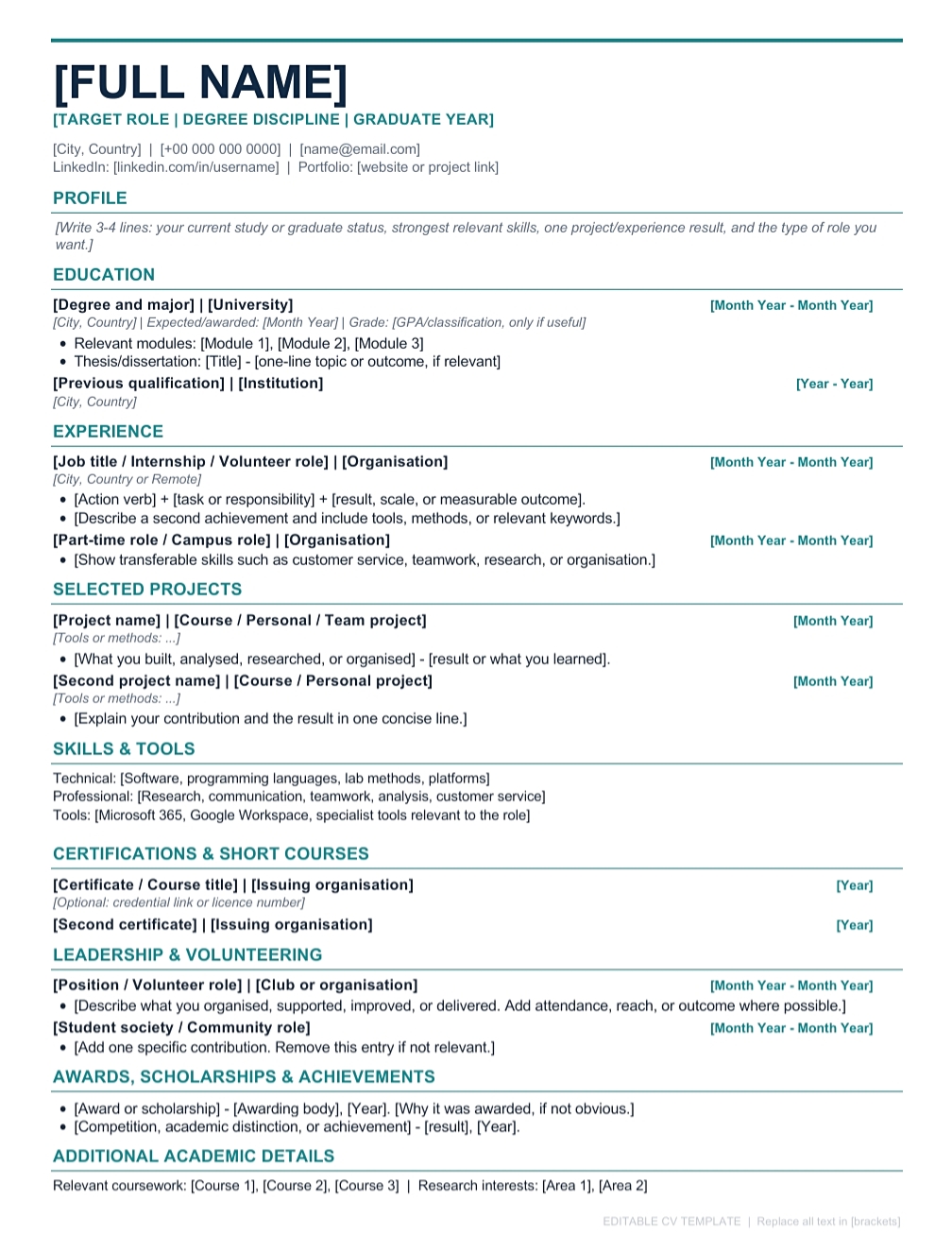
General student CV example. The candidate name, education and experience are fictional and are included to demonstrate how the template can be completed.
Sections included in this CV template:
- Full name and contact information
- Professional headline or target role
- Personal profile or career summary
- Education and relevant coursework
- Employment history and internships
- Academic, personal and university projects
- Technical and transferable skills
- Volunteering and community involvement
- Leadership and student society activities
- Certifications and professional training
- Awards, scholarships and achievements
- Languages and additional information
- References, if requested by the employer
This template works well for part-time jobs, graduate opportunities, entry-level roles, campus jobs and general internship applications. It is also a useful starting point if you have no formal employment history but have completed relevant projects or extracurricular activities.
Download Word — A4Download PDF — A4
Download Word — US LetterDownload PDF — US Letter
2. Internship and Work Placement CV Template
This design is made for students applying for internships, industrial placements, summer internships, work experience programmes and graduate trainee positions.
It places more attention on the skills and experience that relate to a target role. This is useful when you have completed coursework, practical assignments or university projects that show you can contribute to a workplace, even if you have not held a full-time job.
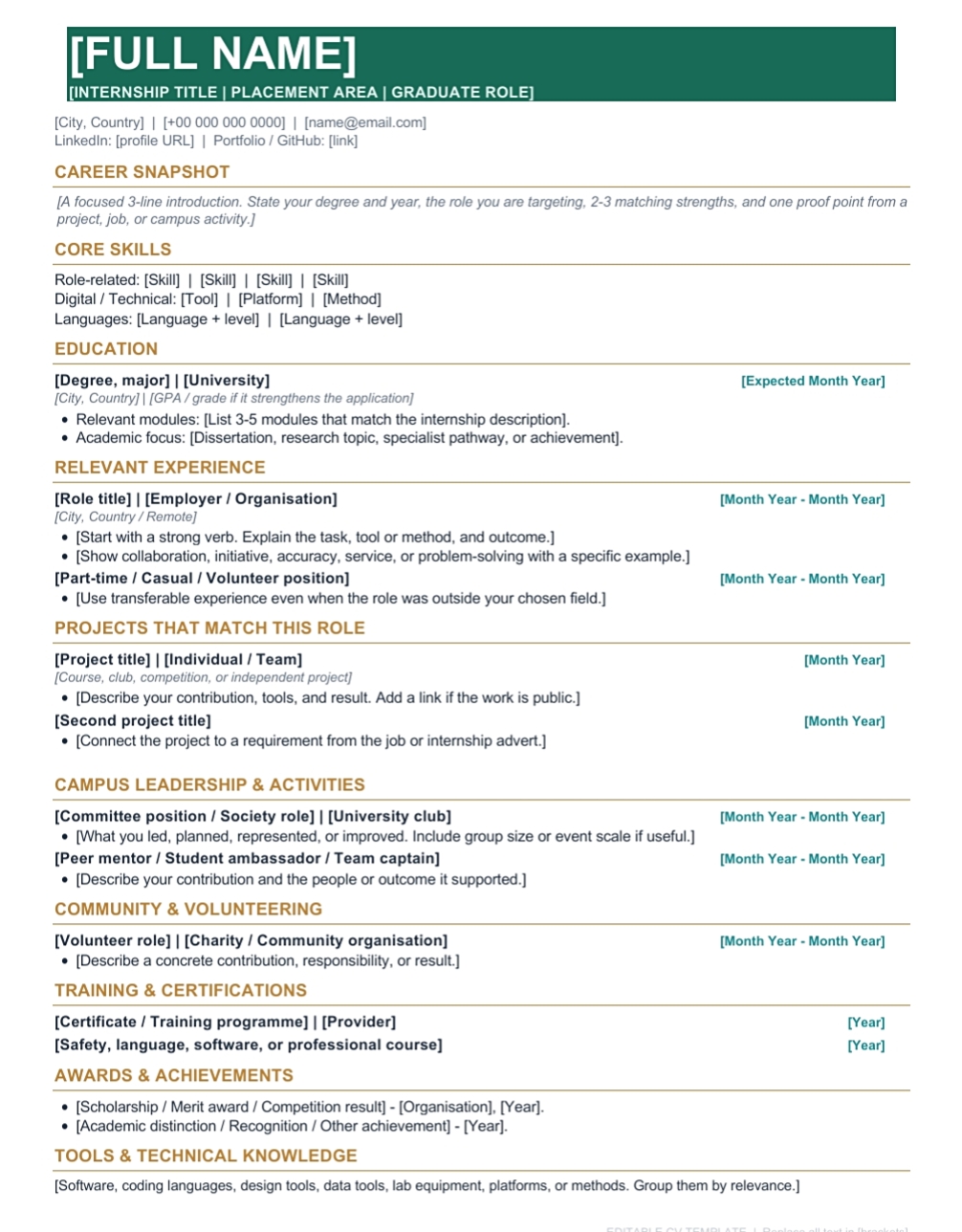
Internship CV example. The details shown are fictional and demonstrate how a student can present relevant experience.
Sections included in this CV template:
- Contact information and target position
- Short profile tailored to the internship
- Education and relevant university modules
- Role-specific technical and transferable skills
- Internship, employment and practical experience
- Selected academic and personal projects
- Student society and campus activities
- Volunteering and community work
- Training, courses and certificates
- Achievements and relevant extracurricular activities
- Availability or additional information, when requested
For example, a computer science student applying for a software internship could highlight programming languages, software projects and relevant coursework. A biology student applying for a laboratory placement could emphasise laboratory methods, research assignments and data analysis skills.
Before applying, read the job advert and move the most relevant experience towards the top of your CV. You can keep the same basic design while changing the profile, skills and project descriptions for different applications.
Download Word — A4Download PDF — A4
Download Word — US LetterDownload PDF — US Letter
3. Academic and Research CV Template
An academic CV has a different purpose from a standard job CV. It gives more space to your academic background, research interests, dissertation, publications, teaching experience, conference presentations and other scholarly work.
This design is suitable for research assistant applications, postgraduate study, PhD programmes, academic placements and other research-related opportunities.
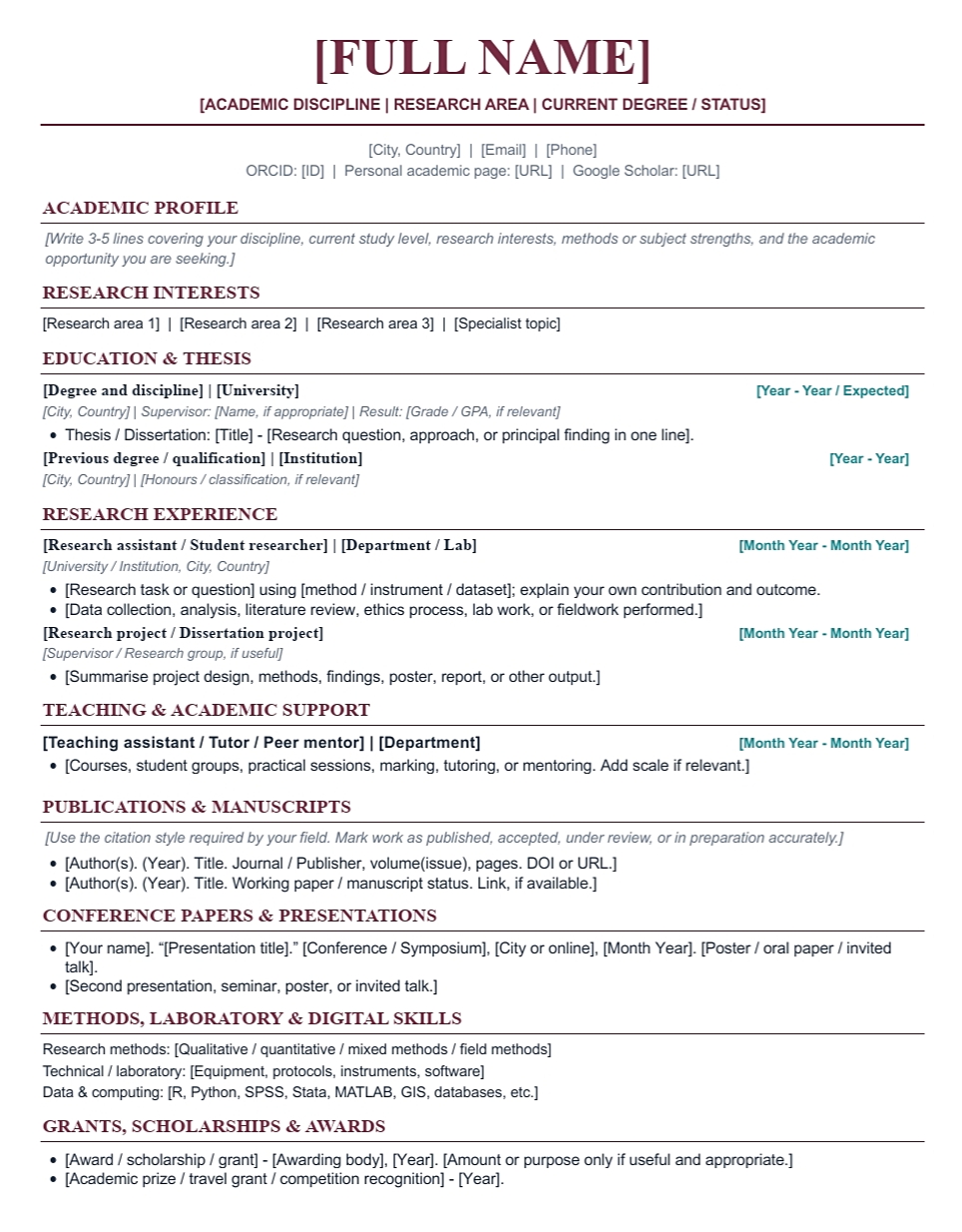
Academic and research CV example. The candidate details and academic history are fictional.
Sections included in this CV template:
- Contact information and academic profile
- Research interests
- Education and academic qualifications
- Thesis, dissertation and major research projects
- Research experience and laboratory work
- Publications and manuscripts, where applicable
- Conference papers and presentations
- Teaching, tutoring and mentoring experience
- Research methods and technical skills
- Research software and laboratory techniques
- Grants, scholarships and academic awards
- Academic service and professional memberships
- Academic referees, when required
You do not need to fill every section. If you have not published a paper, for example, remove the publications heading. If you have completed a dissertation or research project, describe your research question, methods and contribution clearly.
Download Word — A4Download PDF — A4
Download Word — US LetterDownload PDF — US Letter
Which CV Template Should You Choose?
Choose a template based on the opportunity you are applying for and the experience you can show. A more decorative layout does not automatically make a stronger application. The content should help the employer or admissions team understand your qualifications.
- General student CV: best for first jobs, part-time work, entry-level positions and broad graduate applications.
- Internship CV: best for internships, placements, summer programmes and graduate trainee roles.
- Academic CV: best for research positions, postgraduate applications, PhD programmes and academic roles.
If you are applying for a scholarship, check the university or funding provider’s instructions. Some applications ask for a short CV, while research-based programmes may require a detailed academic CV. You can also explore the OopsGene undergraduate scholarships section for scholarship opportunities and application guidance.
How to Open a CV Template in Google Docs
The templates on this page are editable Microsoft Word files in DOCX format. They are not public Google Docs links. You can upload the Word files to Google Drive and edit them in Google Docs without rebuilding the layout from scratch.
Follow these steps:
- Choose the A4 or US Letter version that matches the application requirements.
- Download the Word file ending in .docx.
- Open Google Drive and sign in to your Google account.
- Select New, then choose File upload.
- Upload the DOCX file from your computer.
- Find the uploaded file in Drive, open it and select Open with Google Docs.
- Replace the prompts with your own information and remove sections you do not need.
- Check the page layout, spacing and page breaks after editing.
Google explains that users can upload, open, edit and save Office files in Google Drive and Docs. You can also convert a Word document into Google Docs format, which creates a separate Google Docs copy. See the official Google guide to working with Microsoft Office files.
Keep an unchanged copy of the original template. When you apply for different jobs, make a new copy and adjust the profile, skills and experience to match each application.
What Should a Student CV Include?
A student CV should give the reader a clear picture of your education, abilities and relevant experience. You do not have to include every possible section. Start with the details that best support the application.
1. Contact Information
Include your full name, professional email address, telephone number and current city or location. Add a LinkedIn profile, portfolio or personal website if it is relevant and up to date.
Use an email address that you check regularly. Check that your phone number includes the correct country code if you are applying internationally. You generally do not need to include your full home address, passport number, national identity number or other sensitive personal details.
2. Personal Profile or Career Summary
A personal profile is a short introduction near the top of your CV. It should explain what you are studying, the strengths you can offer and the type of position you are seeking.
For example:
Business student profile: “Final-year business student with experience in market research, Excel-based data analysis and student society events. Seeking a marketing internship where I can apply research and communication skills while learning from a professional team.”
Use this only as a writing example. Replace it with your real degree, skills and career interests. Avoid generic claims such as “hardworking and motivated” unless you provide evidence of what you have done.
3. Education
For most students and recent graduates, education is one of the most important sections. Include your degree, university, location and expected or completed graduation date. You can also mention your current year of study.
Add relevant coursework, a thesis title, an academic award or a strong result when it supports the application. You do not need to list every module or school subject.
4. Work Experience and Internships
Include employment, internships, part-time jobs, temporary work and relevant placements. For each role, list the job title, organisation, location and dates.
Use short bullet points to explain your responsibilities and results. Start with clear action verbs such as organised, analysed, designed, researched, prepared, developed or supported. Include figures when you have accurate information, such as the number of people you helped or the size of a project you worked on.
5. Academic and Personal Projects
Projects can provide useful evidence when you have limited employment experience. Include relevant coursework projects, independent research, coding projects, laboratory work, design assignments or community projects.
For each project, explain its purpose, your contribution, the tools or methods you used and the result. If it was a group assignment, make your own contribution clear. Do not claim the work of the whole team as your individual achievement.
6. Technical and Transferable Skills
List skills that are relevant to the job or programme. Depending on your subject, these might include programming, laboratory techniques, statistical analysis, writing, research, data visualisation, presentation, customer service or project coordination.
Be specific about software and tools. For example, “Excel, Python and SPSS” gives more information than “computer skills”. Be honest about your ability level and do not list a tool simply because you have heard of it.
7. Volunteering, Leadership and Extracurricular Activities
Student societies, sports teams, volunteering, event organisation, peer mentoring and community activities can show useful skills. Include activities that demonstrate responsibility, teamwork, communication, organisation or subject-related experience.
Explain what you contributed. “Member of the university science society” is less informative than describing how you helped organise an event, coordinate volunteers or mentor new students.
8. Certifications, Awards and Languages
Include relevant certificates, short courses, competitions, scholarships and academic awards. Add the issuing organisation and completion date where useful. If a course is still in progress, label it clearly rather than presenting it as completed.
For languages, describe your level accurately. If you have a formal language test result, include the test name, score and date when it is relevant to the application.
9. Research and Academic Experience
Students applying for research or postgraduate opportunities may need extra sections. These can include research interests, dissertation work, publications, conference presentations, teaching experience, research methods, grants and academic referees.
Only list work that exists. If a manuscript is under review or a project is in progress, describe its status accurately. Do not describe a normal class assignment as a published paper or funded research project.
How to Write a CV With No Work Experience
You can create a strong starting CV without having held a paid job. Employers recruiting students and entry-level applicants may consider academic projects, practical coursework, volunteering, student activities and transferable skills.
Start with your education and put your most relevant evidence near the top. A student applying for a software internship might lead with programming projects and technical skills. A student applying for a laboratory placement might highlight research methods, laboratory coursework and practical experience.
Use this structure if you have no formal employment history:
- Contact information: your name, email, telephone number and relevant professional links.
- Short profile: your degree, main strengths and target opportunity.
- Education: your university, course, expected graduation date and relevant modules.
- Projects: coursework, research, personal or group projects.
- Skills: relevant tools, methods, technical abilities and communication skills.
- Activities: volunteering, leadership, societies, tutoring or other responsibilities.
- Certificates and awards: relevant training and achievements.
Example project entry:
Student Research Project — University Coursework
September 2025 – December 2025
- Reviewed academic sources to define a research question and prepare a project plan.
- Collected and organised information using the methods taught in the course.
- Worked with a student team to analyse the findings and present the results.
This is an illustrative example. Replace it with a project you actually completed and describe your own contribution. Be ready to explain the tools, methods and results during an interview.
Do not create an empty Work Experience section just because a template includes one. Use a suitable heading such as Projects, Relevant Experience, Research Experience or Volunteering instead.
How to Make Your CV ATS-Friendly
Many employers use applicant tracking systems, often called ATS, to collect applications and organise candidate information. These systems differ, and employers may configure them in different ways. A CV that looks attractive on a screen can still be difficult for some software to read if key information is placed inside complex design elements.
For applications submitted through an employer’s online portal, a simple, text-based layout is a sensible starting point. Use the following checks before submitting your CV:
- Use conventional section headings. Choose labels such as Education, Work Experience, Projects, Skills and Certifications.
- Keep the reading order simple. A single-column layout is easier to follow from top to bottom.
- Avoid tables and text boxes. Some resume parsers may not extract information from complex layouts correctly.
- Do not put important information in graphics. Your name, contact details, job titles and skills should be ordinary text, not images or icons.
- Use a readable font. Choose a standard font and a clear size. Make section headings easy to recognise.
- Use relevant keywords naturally. Read the job advert and include skills or qualifications when you genuinely have them.
- Keep dates consistent. Use a clear date format and list recent experience first within each section.
- Follow the employer’s file instructions. Submit PDF or DOCX according to the application portal’s requirements.
Greenhouse, for example, lists graphics, photos, word art, complex tables, headers, footers, text boxes and columned layouts among the formatting issues that can lead to an unsuccessful resume parse. This is guidance about Greenhouse’s parser, not a universal rule for every ATS. Read its official resume parsing guidance for more detail.
The templates on this page use a straightforward reading order and standard section labels. That makes them ATS-conscious, but no CV design can guarantee compatibility with every employer’s system.
Should You Use an ATS CV Checker?
An ATS CV checker can be useful as a final review. Depending on the tool, it may identify missing terms from a job advert, unclear headings, possible formatting problems or sections that are difficult to extract.
However, an ATS checker does not know every employer’s screening rules. A high score does not guarantee an interview, and a low score does not automatically mean your CV will be rejected.
Use a CV checker as an optional second opinion. Read its suggestions carefully and only add information that is true. Do not change your CV just to increase a score if the suggested keywords do not describe your real skills or experience.
Be careful when uploading a CV to an unfamiliar online checker. Your document may contain your email address, telephone number, education history and employment details. Read the service’s privacy policy and data-retention terms before uploading personal information.
You can also carry out a basic text check yourself:
- Export your CV as a PDF.
- Open the PDF and select some of the text.
- Copy it into a plain-text editor.
- Check that your name, contact details, education, experience and skills appear in the right order.
- Look for missing words, broken dates or information that has moved into the wrong section.
If the copied text is jumbled or incomplete, simplify the layout and check the exported document again.
Google Docs vs Canva CV Templates: Which Is Better?
Google Docs and Canva can both be used to create a CV. The right choice depends on the type of role, the design you need and how the document will be reviewed.
Google Docs CV Templates
Google Docs is useful if you want a simple, editable CV that you can update for different applications. It is practical for students who prefer a text-based layout, work across devices or keep documents in Google Drive.
You can edit the Word files on this page in Google Docs by uploading them to Drive. You can also create a copy in Google Docs format if you prefer to work with a native Google document.
For job applications that use an online recruitment portal, focus on clear headings and readable text. A simple layout is often a sensible choice when you are unsure how the employer’s system will read your CV.
Canva CV Templates
Canva offers a large collection of CV and resume designs. It can be useful if you want more control over colours, typography and visual presentation. Some layouts are simple and text-led, while others use columns, icons, graphics and decorative elements.
You can explore these official Canva galleries:
- Canva CV templates — browse CV designs by style and industry.
- Canva resume templates — explore resume layouts for different roles.
- Canva student templates — browse student designs, including student CV and resume examples.
Some Canva designs are free, while others may require a paid plan or purchase. Check the price or plan label before spending time editing a template.
Are Canva CV templates ATS-friendly? Some simple Canva layouts may be suitable for online applications, but do not assume that every design will be read correctly by every ATS. Check whether the template uses columns, tables, text boxes, icons or graphics. Keep essential information as selectable text and test the exported file before submitting it.
Which should you choose? Use Google Docs or a simple Word document when easy editing and clear text are your main priorities. Consider Canva when visual presentation is relevant to the role, particularly for creative work. Follow the employer’s instructions and check the final file in either case.
CV or Resume: What Should International Students Use?
The words “CV” and “resume” are used differently across countries. In the United Kingdom and many other countries, CV is the standard term for a job application document. In the United States and Canada, a resume is commonly used for non-academic jobs, while a CV often refers to a longer academic record.
Employers and universities may use their own terminology, so follow the wording in the job advert or application instructions. If an employer asks for a resume, do not automatically send a long academic CV. If a research programme asks for an academic CV, include the academic details relevant to that application.
International students should also check local expectations before submitting. Photograph requirements, personal details, page length and document format can vary by country, institution and employer. Do not assume that a photograph, date of birth, nationality or full home address is required. Follow the specific application instructions.
Should You Choose A4 or US Letter?
Page size matters when you print or submit a CV. A4 is commonly used in many countries, while US Letter is commonly used in the United States and Canada.
Choose the version that matches the employer’s instructions or the conventions of the application destination. If no page size is specified, use the format commonly accepted in the country where you are applying.
Do not simply change the page size at the last moment without checking the document. Different page dimensions can affect line breaks, spacing and page count. Open the final file and review every page before submitting it.
How Long Should a Student CV Be?
There is no single page limit that applies to every country, employer and type of application. For an entry-level job or internship, keep the CV focused and remove information that does not help demonstrate your suitability. A concise one- or two-page document may be appropriate depending on local expectations and your experience.
An academic CV can be longer when the application requires details about research, teaching, publications or conference presentations. Do not remove relevant academic work simply to meet a page count that the university has not requested.
The templates on this page include optional sections. Your completed CV may take more than one page if you use many of them. Keep the strongest and most relevant information, and remove sections that do not apply.
How to Download Your CV as a PDF
After editing your CV in Google Docs, save a copy in the format requested by the employer. If PDF is accepted, it can preserve your document’s layout across different devices.
- Open your completed CV in Google Docs.
- Check the spelling of your name, email address, dates and section headings.
- Open the File menu.
- Select Download and choose PDF Document (.pdf).
- Open the downloaded PDF and review every page.
- Check that the text can be selected and copied.
- Upload the file using the employer’s application instructions.
Use a clear filename such as FirstName_LastName_CV.pdf or FirstName_LastName_Internship_CV.pdf. Avoid confusing names such as “mycv-final-final2.pdf”. If the employer specifies a filename or file type, follow its instructions.
Common Student CV Mistakes to Avoid
- Sending the same CV to every employer: tailor your profile, skills and examples to the role.
- Listing skills without evidence: explain where you used a skill in a project, course, job or activity.
- Leaving empty sections: remove headings that do not apply instead of leaving them blank.
- Writing long paragraphs: use short descriptions and focused bullet points.
- Exaggerating your experience: describe your real contribution and be ready to explain it.
- Using a complicated design for every application: keep the reading order clear, especially for online portals.
- Including unnecessary personal information: avoid sensitive identity details unless an official process specifically requires them.
- Skipping the final review: check spelling, dates, links, page breaks and text order before submitting.
Frequently Asked Questions
Does Google Docs have free CV templates for students?
Google Docs has a template gallery, and you can also upload and edit Word files in Google Drive. The three student CV templates on this page are downloadable DOCX files that you can open in Google Docs. They are not shared Google Docs links.
How do I get a free CV template in Google Docs?
Download one of the Word templates from this page, upload it to Google Drive and open it with Google Docs. You can edit the Office file directly or convert a copy to Google Docs format. Check the layout after editing.
Which Google Docs CV template is best for students?
The general student CV is a good starting point for most students and fresh graduates. Choose the internship version when applying for placements or work experience, and the academic CV when applying for research or postgraduate opportunities.
Can I create a CV in Google Docs without work experience?
Yes. You can use your education, projects, relevant coursework, volunteering, student activities and skills to build your CV. Put the most relevant evidence near the top and remove any empty work experience section.
Are Google Docs CV templates ATS-friendly?
They can be suitable when they use clear headings, ordinary text and a simple reading order. However, no template is guaranteed to work with every applicant tracking system. Follow the employer’s file instructions and check the exported document before submitting it.
Are Canva CV templates suitable for job applications?
Some Canva designs may be suitable, especially simple layouts with clear headings and selectable text. Other designs use columns, graphics or text boxes that may be harder for some systems to process. Inspect the design and test the exported file before applying.
Should I use A4 or US Letter for my CV?
Use the page size requested by the employer or institution. A4 is common in many countries, while US Letter is commonly used in the United States and Canada. Both sizes are available in our downloads.
Should I include a photograph on my CV?
Do not assume that a photograph is required. Expectations vary by country and employer. Check the application instructions and local guidance. If no photograph is requested, focus on the information that demonstrates your suitability.
How many pages should a student CV be?
Keep an entry-level job or internship CV focused, and follow the conventions of the country and employer. An academic CV may need more pages if you have relevant research, teaching, publications or conference experience to document.
Should I download my CV as a PDF or Word file?
Use the format requested by the employer. A text-based PDF can preserve the layout, while some application portals request DOCX. Always check the instructions and review the uploaded file.
Can an ATS CV checker guarantee that my CV will pass?
No. An ATS CV checker can identify possible formatting issues or missing role-related terms, but it cannot guarantee how a particular employer’s system will process or assess your application. Treat its score as one review tool, not a promise of selection.
Start Building Your Student CV
You do not need years of employment history to prepare a useful student CV. Your education, projects, practical skills, volunteering and university activities can all help demonstrate what you can contribute.
Choose the design that matches your application, download the editable Word file and open it in Google Docs or Microsoft Word. Remove sections you do not need, use specific examples and tailor the final CV to the opportunity.
When you are ready to look for opportunities, explore the OopsGene internships page and the main opportunities section. You can also browse our student resources and undergraduate scholarships pages.
Choose a template, make it your own and check the final document before sending your next application.
Browse more articles or visit the Student Hub for guides, resources and opportunities.